The Computer Doctor strikes again

As reported in Rants and Revelations : The Computer Doctor is IN, I did some major disk swappery when Stevie’s iBook died a few months ago. I put Stevie’s hard drive in Vicki’s iBook, and Vicki’s hard drive in a 15″ Powerbook Titanium that she borrowed from work. Well, Stevie graduated, and as a graduation present she was given a MacBook. So it’s time to reverse the surgery, putting Vicki’s hard drive back in her iBook, and the original hard drive back in the Powerbook.

Time to haul out the Torx and Phillips screw drivers, and most importantly the Fixit Guilde.

Putting the hard drive back in the Powerbook is pretty straight forward, except taking the ide cable off the hard drive is a little brute force for my liking. Only 9 screws, all the same head and general size. And after a little coaxing and swearing, it went back together and booted.

Putting the hard drive back in the iBook is a real pain in the ass. Lots of fiddly crap, including a bit where it says

Breathe deeply. Trying times are ahead, but we promise the lower case does come off.

and another bit where after about 30-45 minutes of work, you get to the bit where it says

Remove the following 16 screws:

But at least they put handy little loops on the ide cables so that they could be removed without bending any pins.

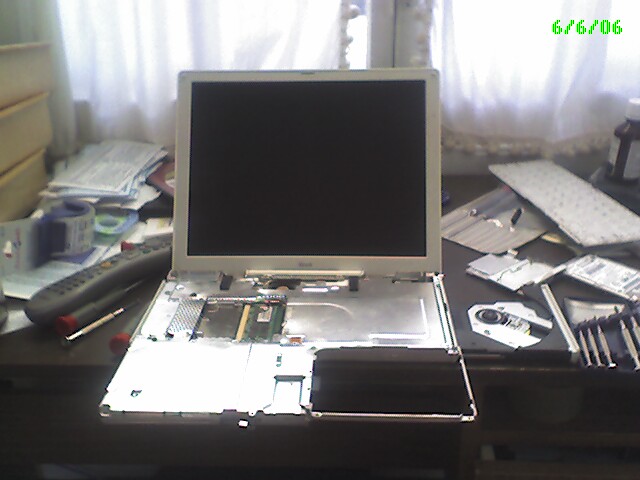
In progressThis is about that stage. (As you can see, I’m a firm believer that a clean organized desk is obviously a pre-requisite for doing good work.)

Actually, it was a lot easier having done this a few times now. But I still held my breath as I booted it up and make sure the fiddliest bits, the trackpad and speaker cables got hooked up correctly and it boots properly. And it did! Yay for me!

While dis-assembling and assembling this iBook, several of the Torx screws were getting very rounded off – I had a hell of a time removing one or two of them. I have my doubts that I’ll be able to get the screws off again. I guess next time it breaks, Vicki will have to get a MacBook too.

Product Review: Innopocket Hard Case for Palm Treo

After wrecking my Treo at Pinckneyville, I decided the replacement (that goodness I bought insurance on it) needed a bit more protection. I got the Innopocket Magnesium Case for Palm Treo.

The case appeared to be ideal, with strong clear plastic over the screen and strong magnesium everywhere else important. Even better, the case has a good double hinge so you can get the front out of the way to use the whole device. The reviews warned me about one drawback – there is a nubbin on the back to clip into the belt clip, and when you fold back the front the nubbin touches the clear screen protector. And sure enough, there is a bit of a wear mark there. But then again, better wear on a replaceable case than on the Treo itself.

The design of the case seems to have placed a premium on access to all the extraneous bits of the phone, like the SD card and the camera. That can be handy at times. But it has also lead to a couple of drawbacks:

  • The SD card keeps popping out. Especially when the phone pops out of the belt clip and drops on the ground.
  • There isn’t anything along the top to secure the phone in place if the hinge opens, which has lead on more than one occassion to the phone dropping on the floor.

The belt clip is an interesting design and works pretty well, except when the clip itself falls off my shorts.

Not a complaint about the case itself, but more a simple observation: a couple of times I’ve forgotten that the case was closed and attempted to “touch” on the touch screen. Doesn’t work through the screen protector.

In summary: I like the case, and can overlook the small flaws. I hope it will protect the Treo, especially since Cingular cancelled my insurance for having the temerity for making a claim against it.

It’s good to be a geek.

Driving to work today, I see the police blocking off my normal exit to Hwy 104. And up the road, a huge lineup of cars waiting to exit on the only alternate route I know, Ridge Road. Fortunately, I’m a geek, and a pilot. I reach back to my flight bag on the back seat and pull out my Garmin 296 GPS, fire it up in Automotive mode, and hit the “Waypoint” button, find the waypoint I set on Work, and select it. It immediately tells me to turn right on some road in 400 feet. I reach into my backpack and pull out the car kit, so I get voice directions for the rest of the trip. After a couple of turns, I was back on Hwy 104 and on my way, no muss, no fuss, no bother. Yeah, I probably could have figured out something, but I didn’t have to.

Still scratching my head.

I’m still working on the problem in Rants and Revelations » That’s a head scratcher.

I wrote the thread spawning test program, and it ran 18,000+ iterations overnight on a test machine without the slightest hesitation. I pored over the code to see if there was a “Dining Philosophers”-style lock contention issue. I examined the logs for other programs on the system. And I’m still no closer.

I have a horrible suspicion that the lock up is actually in the database code somewhere. And also, that instead of using threads and locks to make sure I respond to the events quickly but don’t do more than one event at a time, what I really need is an job queue, so I can monitor if a job is taking too long, just kill it and start the next.

But of course since I don’t know where the lock up is actually happening nor can I reproduce it, I’m not sure how to know if my changes are going to fix anything.

That’s a head scratcher

I’m working on the type of bug that might take me a day, it might take me a week, or it might cause me to give up entirely.

In our system, there is a process of mine (the schedule daemon) that gets events from another process (the event broker) and does some database manipulation. Because the events can come thick and fast, and because I don’t want them stepping on each other, each event causes a separate thread to be spawned, and the thread action is guarded by a global “synchronized” object (this is in Java, by the way). Most of the time, this works fine – if an event happens while another thread is still processing, the second one waits for the first one to relinquish the lock, and it does its thing. The event processing threads generally take 5-15 seconds to run.

But I have a log file I from a customer site, where it appears that one of these event threads started at 04:17, and never finished and never relinquished the lock. So events that happened at 04:51, 05:52 and 06:01 never got processed. And I can’t for the life of me figure out why.

I’ve looked extensively at the code between the last progress message from the 04:17 thread and the progress message it should have printed next. Nothing leaps out at me. And like I said, this code works all over the place, even at this customer site most of the time.

One possibility is that some other program is manipulating the database at the time. I do know that the Playlist that was being retrieved at the time of failure is not present in the next day’s backup, so something may have been deleting it at the time.

I wrote a program that calls the same database method as the one that hung over and over again, and ran that in a continuous loop while doing other stuff to the database including deleting the playlist in question. But while I’ve got my test program to fail with an exception numerous times, it never hangs. (I’m assuming that if a thread dies with an exception, it will release its locks. Something else to investigate, I guess.)

I guess my next step is to step up the tree a bit, and instead of calling the low level query multiple times, try spawning the thread that hung multiple times. Other than that, I’m baffled.